
Most online store owners watch one number: sales. If it goes up, they celebrate. If it drops, they panic. But a sale is the last step of a long journey, and it tells you very little about what happened before it.
Why did 10,000 visitors turn into only 200 orders? Did they never find the product? Did they add to cart and leave? Did they abandon at the payment page?
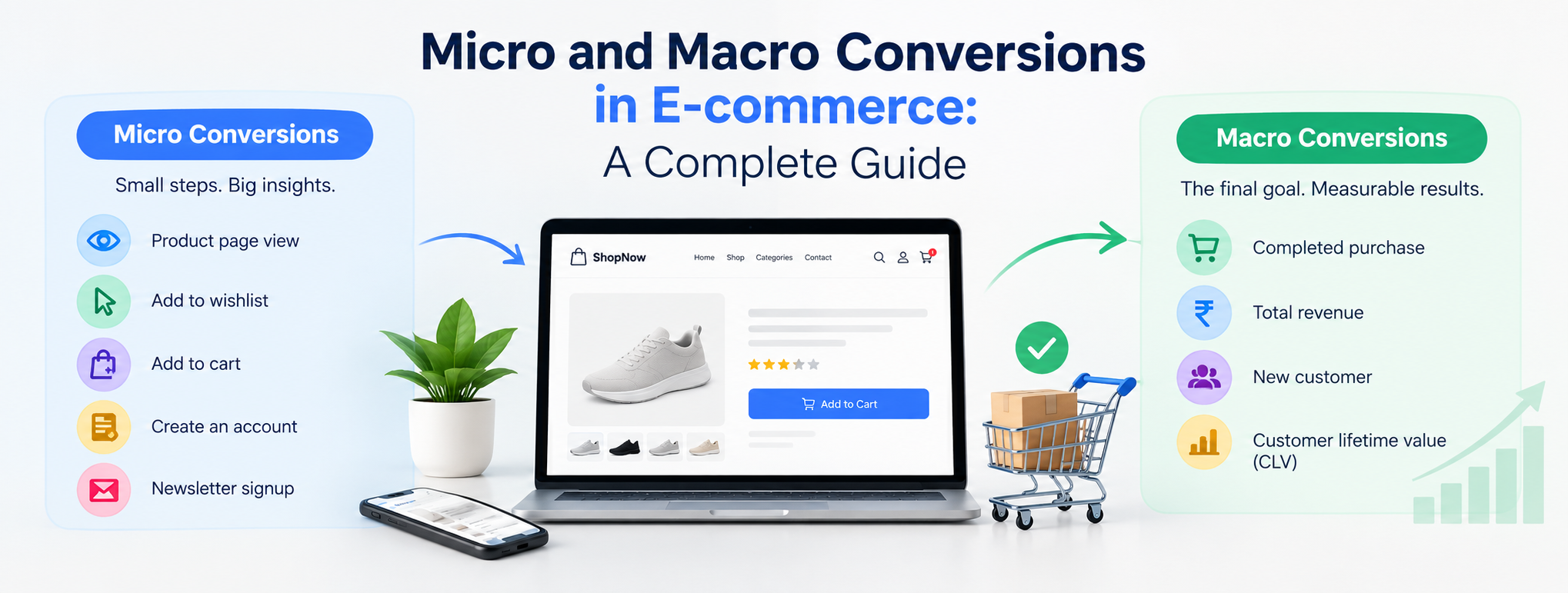
This is where micro and macro conversions in ecommerce come in. Macro conversions are the big outcomes that grow the business. Micro conversions are the smaller steps that lead to them. Tracking both shows you where shoppers are engaged and where they quietly leave.
In this guide you'll learn:
- What micro and macro conversions are
- The difference between micro vs macro conversions
- Practical examples of micro and macro conversions for online stores
- How they fit into the ecommerce conversion funnel and customer journey
- How to set up ecommerce conversion tracking in GA4
- How to use both for ecommerce conversion rate optimization
What Are Micro and Macro Conversions in Ecommerce?
A conversion is any valuable action a visitor takes on your site. Not every action carries the same weight, so marketers split them into two groups. The idea was popularized by digital analytics expert Avinash Kaushik, and it remains a foundation of conversion optimization today.
What Are Macro Conversions in Ecommerce?
Macro conversions in ecommerce are the primary goals of your business, the actions that directly produce revenue or a committed customer relationship. For an online store, the clearest macro conversion is a completed purchase.
Macro conversions are:
- Directly tied to revenue. They show up in your sales reports.
- Less frequent. Only a small share of visitors ever buy, and typical e-commerce conversion rates are in the low single digits.
- The final step of a decision. By this point the shopper has said yes to your product, price and brand.
What Are Micro Conversions in Ecommerce?
Micro conversions in ecommerce are the smaller actions that signal interest and move a shopper closer to buying. They don't bring revenue by themselves, but they show intent.
Micro conversions are:
- More frequent. Far more visitors view a product, use search or add to a wishlist than complete a purchase.
- Behavioral signals. They show what shoppers care about and how ready they are to buy.
- Diagnostic. When a micro conversion drops, you can usually find the friction behind it.
Micro conversions fall into two types:
- Process milestones: steps that sit directly on the path to purchase, such as adding to cart or starting checkout.
- Secondary actions: signs of interest that aren't required to buy, such as subscribing to a newsletter, watching a product video or following your brand on social media.
A useful way to think about it: a macro conversion is the "yes," and micro conversions are the many small "yeses" that come first. A shopper who says yes to viewing a product, yes to reading reviews and yes to adding to cart is far more likely to say the final yes at checkout.
Micro vs Macro Conversions: Key Differences
Here is how micro vs macro conversions compare:
| Factor | Macro Conversions | Micro Conversions |
|---|---|---|
| Purpose | Achieve the main business goal | Move shoppers toward that goal |
| Business impact | Direct revenue impact | Indirect, supports revenue |
| Frequency | Low | High |
| Position in journey | End of the funnel | Throughout the funnel |
| What they reveal | Whether the business is growing | Where shoppers engage or drop off |
| Examples | Purchase, subscription order | Add to cart, wishlist, email signup |
| Best used for | Measuring ROI and performance | Diagnosing friction and finding intent |
| Testing speed | Slower (fewer events) | Faster (more events) |
Neither is "better." Micro conversions vs macro conversions is a partnership: macro conversions tell you what happened, and micro conversions tell you why.
Why Micro and Macro Conversions Matter for Ecommerce Conversion Optimization
Macro Conversions Alone Hide the Story
Imagine your store converts at 1.5%. That number doesn't say whether the problem is traffic quality, product pages, pricing, trust or checkout. Micro conversions break the journey into measurable pieces so you can see the leak.
Micro Conversions Reveal Buyer Intent
Not every visitor is ready to buy on the first visit. Someone who saves a product to a wishlist, uses the size guide or downloads a catalogue is telling you they're interested. Tracking these actions lets you build audiences for remarketing, email flows and personalized offers.
Micro Conversions Expose Friction
If thousands of shoppers view products but few add to cart, the product page has a problem. Perhaps the price is unclear, delivery details are missing, or reviews are thin. If many add to cart but few start checkout, look at shipping costs or a forced login. Each drop points to a fix.
Micro Conversions Speed Up Testing
Purchases are rare events, so an A/B test on purchase rate can take weeks to reach statistical confidence on a small store. Micro conversions occur more often, so they give you signal sooner. But faster isn't automatically better, and we'll cover the risk of chasing the wrong micro conversions later.
Together, these benefits make micro and macro tracking the foundation of any ecommerce conversion rate optimization program. If you want help building that foundation, our ecommerce SEO services in Bangalore connect traffic growth with conversion outcomes.
Macro Conversion Examples in Ecommerce
Here are common ecommerce macro conversion examples to track:
- Completed purchase / order placed: the primary macro conversion for nearly every store.
- Subscription or repeat order: for stores selling coffee, supplements, pet food or other consumables.
- Account registration with first purchase: common in marketplaces and membership-based shops.
- Lead form submission for high-ticket or B2B products: for stores selling furniture, machinery, bulk supplies or custom orders where buyers ask for a quote first.
- Booking or appointment: for stores with a showroom or trial option.
- Repeat purchase: a second order from an existing customer, often the best sign of loyalty.
These examples of macro conversions vary by business model. A D2C fashion brand's macro conversion is an order. A B2B industrial supplier's might be a quote request. Define yours clearly, because everything else is measured against it.
Micro Conversion Examples in Ecommerce
The most useful ecommerce micro conversion examples are grouped by the stage of the shopping journey. Use these examples of micro conversions as a checklist.
Discovery Stage
- Landing on a product or category page from search, ads or social
- Using on-site search
- Clicking a menu or banner to reach a category
- Scrolling past a set depth on a category page
- Viewing more than one page in a session
Consideration Stage
- Viewing a product detail page
- Clicking product images or zooming
- Watching a product video
- Reading or filtering reviews
- Using a size guide or comparison tool
- Checking delivery availability with a pincode
- Downloading a catalogue, brochure or spec sheet
- Clicking WhatsApp chat or live chat
- Applying filters and sorting
Intent Stage
- Adding a product to the wishlist
- Adding a product to the cart
- Clicking "Save for later"
- Subscribing to a newsletter or back-in-stock alert
- Creating an account
- Applying a coupon code
Checkout Stage
- Beginning checkout
- Entering shipping details
- Selecting a shipping method
- Choosing a payment method (UPI, card, net banking, COD)
- Entering payment information
Post-Purchase Stage
- Viewing the order confirmation page
- Signing up for order tracking updates
- Leaving a product review
- Sharing the product or referring a friend
- Following the brand on social media
Every one of these micro conversion examples in ecommerce gives you a data point about intent. The trick is deciding which ones matter for your store, which we'll cover in the goal-setting section.
Ecommerce Conversion Funnel and Customer Journey
To use micro and macro conversions well, connect them to your ecommerce conversion funnel and the wider ecommerce customer journey.
The funnel is the simplified path shoppers follow:
- Awareness: they discover your brand or product.
- Consideration: they compare, read and evaluate.
- Intent: they signal they might buy.
- Purchase: they complete the macro conversion.
- Retention: they return, reorder and recommend.
Here's how micro and macro conversions map to it:
| Funnel Stage | Typical Micro Conversions | Macro Conversion |
|---|---|---|
| Awareness | Product page views, search use, category clicks | N/A |
| Consideration | Video views, review reads, pincode checks, catalogue downloads | N/A |
| Intent | Wishlist adds, add to cart, email signups | N/A |
| Purchase | Begin checkout, payment method selected | Order completed |
| Retention | Review submitted, referral, account login | Repeat purchase |
Real customers rarely move in a straight line. Someone might see an Instagram ad, browse on mobile, save an item, come back through a Google search a week later and buy on desktop. Micro conversions capture these touchpoints, which is why they are essential for understanding the real ecommerce customer journey.
The funnel also connects to your content strategy. Informational blog posts feed the top of the funnel, category pages serve the middle, and product pages close the sale. Building topical authority helps you attract shoppers at every stage, and a strong long-tail keyword strategy brings in high-intent visitors who are already close to a micro or macro conversion.
Ecommerce Conversion Tracking: How to Set It Up
Good ecommerce conversion tracking is what turns this theory into decisions. Here's a practical setup using Google Analytics 4 (GA4) and Google Tag Manager.
Step 1: List Your Macro and Micro Conversions
Write down your one or two macro conversions and 8 to 12 micro conversions across the funnel. Don't track everything. Track what you'll act on.
Step 2: Use GA4's Recommended E-commerce Events
GA4 offers standard events that map neatly to the funnel:
- view_item_list and select_item: browsing category pages
- view_item: product page view
- search: on-site search
- add_to_wishlist: wishlist add
- add_to_cart: cart add
- begin_checkout: checkout started
- add_shipping_info and add_payment_info: checkout steps
- purchase: macro conversion
- sign_up and generate_lead: account and lead actions
Using standard event names means GA4's built-in e-commerce reports work without extra configuration.
Step 3: Mark Key Events
In GA4, conversions are now called key events. Mark purchase as a key event. Mark only the micro conversions that are genuinely meaningful, such as add_to_cart, begin_checkout or generate_lead. Marking too many dilutes your reporting.
Step 4: Assign Values
Where possible, pass a value with each event. purchase should carry the order value, tax and currency. For micro conversions, you can assign an estimated value based on how often that action leads to a sale. Value assignment helps you compare the impact of different actions and channels.
Step 5: Track Custom Micro Conversions with GTM
Some valuable actions don't have a default event. Use Google Tag Manager to track:
- Video plays on product pages
- Clicks on WhatsApp or call buttons
- Size guide opens
- Pincode checks
- Catalogue downloads
- Scroll depth on long category pages
Step 6: Test and Validate
Use GA4 DebugView and Tag Manager preview mode to confirm events fire once, with the right parameters. Duplicate purchase events are a common issue that quietly inflates your numbers.
Step 7: Build Funnel Explorations
In GA4's Explore section, create a funnel from view_item to add_to_cart to begin_checkout to purchase. This shows the exact percentage of drop-off at each step.
Reliable tracking also depends on a technically healthy site. Slow pages, broken scripts and mobile errors can prevent events from firing or push shoppers away before they act. Our technical SEO services in Bangalore cover site speed, crawlability and clean implementation that support accurate tracking.
Ecommerce Conversion Metrics to Monitor
Here are the key ecommerce conversion metrics for each type.
Macro Conversion Metrics
- Ecommerce conversion rate: orders divided by sessions
- Revenue and average order value (AOV)
- Revenue per session
- Repeat purchase rate
- Customer acquisition cost (CAC) and return on ad spend (ROAS)
- Customer lifetime value (CLV)
Micro Conversion Metrics
- Product view rate: sessions with at least one product view
- Add-to-cart rate: cart adds divided by product views
- Cart-to-checkout rate: checkouts started divided by carts
- Checkout completion rate: purchases divided by checkouts started
- Cart abandonment rate
- Wishlist and email signup rate
- On-site search usage and search-to-purchase rate
- Engagement rate and scroll depth
Compare these by device, traffic source and new versus returning visitors. Averages hide problems. A store might convert well on desktop and poorly on mobile, or well from organic search and poorly from paid social.
How to Set Ecommerce Conversion Goals
Setting ecommerce conversion goals means choosing what to optimize and in what order.
1. Start with the Macro Goal
Set a specific target, such as "increase checkout completion from 45% to 55%" or "grow monthly orders by 20%." Tie it to revenue.
2. Choose Micro Conversions That Actually Predict Sales
This step separates useful tracking from vanity metrics. Look at your data and ask: do shoppers who complete this micro conversion buy more often than those who don't?
For example, compare the purchase rate of visitors who used the size guide against those who didn't. If size guide users buy noticeably more, it's a strong micro conversion worth improving. If newsletter signups rarely lead to purchases, don't treat them as a priority.
3. Prioritize by Impact and Effort
Score each candidate on:
- Proximity to purchase: closer means more valuable
- Volume: enough events to measure changes
- Ease of improvement: can you fix it quickly?
Focus first on high-impact, high-volume, easy-to-fix steps, which are often cart and checkout micro conversions.
4. Review Regularly
Buyer behavior changes with seasons, festivals and campaigns. Revisit your goals every quarter.
Ecommerce Conversion Optimization: Practical Strategies
With tracking in place, here's how to improve ecommerce conversion optimization results at each level.
Improve Discovery Micro Conversions
- Make navigation and category structure clear
- Improve on-site search with autocomplete and typo tolerance
- Optimize category and product pages for search intent
- Use descriptive, keyword-rich titles that match how people search
Improve Consideration Micro Conversions
- Show high-quality images, video and zoom
- Add reviews, ratings and user photos
- Display delivery time, return policy and COD availability near the buy button
- Add size guides and comparison tables
- Offer WhatsApp or chat support on product pages
Improve Intent Micro Conversions
- Make the add-to-cart button prominent, especially on mobile
- Show stock levels and honest urgency
- Offer back-in-stock and price-drop alerts
- Trigger email or WhatsApp reminders for wishlisted items
Improve Checkout and Macro Conversions
- Offer guest checkout
- Reduce form fields and enable autofill
- Support UPI, cards, wallets and COD
- Show all costs early, since surprise shipping charges cause abandonment
- Add trust signals such as secure payment badges
- Ensure fast, stable mobile checkout
Test Systematically
Run A/B tests on one element at a time, such as button copy, product image order or shipping messaging. Judge tests by the macro conversion whenever you have enough volume, and use micro conversions as supporting evidence.
Bring in the Right Traffic
Optimization can't fix the wrong audience. Traffic from relevant, high-intent searches converts better than broad traffic. Quality off-page SEO techniques build authority and referral traffic from sources your buyers trust, while an AI SEO checklist helps your products and content appear in AI-driven search results, where shoppers increasingly begin their research.
Common Mistakes When Tracking Micro and Macro Conversions
Optimizing Micro Conversions in Isolation
A change that lifts product page visits or newsletter signups means little if purchases stay flat. Always check whether a micro conversion improvement moves the macro conversion. Otherwise you may be improving a number that doesn't matter.
Tracking Too Many Events
Fifty tracked events create noise, not insight. Keep a focused list tied to funnel stages.
Treating All Micro Conversions as Equal
A wishlist add and a footer link click are not the same signal. Weight them by how closely they relate to purchase.
Ignoring Data Quality
Duplicate events, missing values and untested tags produce misleading reports. Validate your setup regularly.
Not Segmenting Data
Blended averages hide the real story. Split by device, source, geography and customer type.
Setting No Values
Without values, you can't compare the worth of different actions or channels. Even estimated values are better than none.
Confusing Micro Conversions with Vanity Metrics
Social followers and page views feel good, but they only count as micro conversions if they connect to eventual sales. Test the relationship before you invest in them.
Frequently Asked Questions
Macro conversions are the primary business goals, such as completed purchases. Micro conversions are smaller actions, such as adding to cart, viewing a product or joining a mailing list, that indicate interest and move shoppers toward the macro goal.
Macro conversions directly generate revenue and occur less often. Micro conversions support the journey, occur more often and help you understand shopper behavior and friction. The main difference is business impact and position in the funnel.
Examples of micro conversions include product page views, video views, wishlist adds, add to cart, newsletter signups, using the size guide, checking a pincode and starting checkout.
Examples of macro conversions include completed purchases, subscription orders, repeat purchases and, for high-ticket products, quote requests or booking submissions.
Start with product views, add to cart, begin checkout and add payment info. These sit closest to purchase and reveal the most actionable drop-offs.
They indicate intent and often correlate with purchases, but they don't guarantee them. Test whether each micro conversion is linked to sales in your own data before prioritizing it.
Use GA4's recommended e-commerce events (view_item, add_to_cart, begin_checkout, purchase), mark the important ones as key events, pass values, and validate with DebugView. Use Google Tag Manager for custom micro conversions.
Review at least quarterly, and before major sales seasons or site changes.
Conclusion
Understanding micro and macro conversions in ecommerce changes how you read your store's performance. Macro conversions show whether the business is growing. Micro conversions show how shoppers move, hesitate and leave along the ecommerce customer journey. Track both, connect them to your funnel, and improve the steps that truly influence sales.
Begin with a short list of macro and micro conversions, set up clean tracking in GA4, find the biggest drop-off in your funnel, and fix it one test at a time. Small, consistent gains at each step add up to a meaningful lift in revenue.
If you'd like expert help attracting high-intent traffic and turning it into orders, partner with a trusted SEO company in Bangalore. Our team combines SEO services, technical expertise and e-commerce strategy to grow both traffic and conversions. You can also see how we compare in our roundup of the top 10 SEO companies in Bangalore.

.png)