
Master LinkedIn Ads for B2B in 2026. Explore every LinkedIn ad format, targeting tactic, bidding strategy, and proven tips to boost leads and ROI.
Introduction
If your sales team keeps asking marketing for "better leads," LinkedIn Ads deserve a serious look. LinkedIn is the only major ad platform where you can target a prospect by job title, seniority, company size, and industry at the same time, something Google and Meta simply cannot match for B2B buyers.
But most companies waste budget on LinkedIn because they pick the wrong ad format, target too broadly, or set the wrong bid. The result? High cost-per-click, few qualified leads, and a manager asking why the LinkedIn budget isn't converting.
This guide breaks down every LinkedIn ad format, the LinkedIn advertising targeting options that actually work, realistic costs, and a step-by-step way to launch a LinkedIn Ads strategy that brings in a real pipeline, not just clicks. Whether you're new to LinkedIn B2B advertising or refining an existing account, you'll leave with a practical, ready-to-use playbook.
According to LinkedIn's own marketing data, ads on the platform can lift purchase intent by double digits, and a large share of B2B marketers rank it as their top channel for high-quality leads. That's a strong signal, but only if the execution behind the campaign is right.
What Are LinkedIn Ads?
LinkedIn Ads is the paid advertising platform inside LinkedIn's Campaign Manager that lets businesses promote content, offers, and messages to a professional audience based on job title, industry, company, seniority, and skills.
Unlike Meta or Google, which reach people based on interests or search intent, LinkedIn Ads targeting is built around professional identity. That's why it's the top channel for B2B lead generation on LinkedIn, you're reaching the actual decision-makers, not just anyone who might be interested.
Why B2B Brands Choose LinkedIn Advertising
Here's why LinkedIn marketing consistently outperforms other channels for B2B pipeline:
- Precision targeting. Reach a VP of Marketing at a 200–500 employee SaaS company, and nobody else.
- Higher intent audience. People on LinkedIn are in a professional mindset, not scrolling for entertainment.
- Multiple funnel-stage formats. From brand awareness to bottom-funnel lead capture, there's a format for every stage.
- Better quality over quantity. LinkedIn leads typically have a stronger sales-qualification rate than social leads from other platforms, even at a higher cost per click.
The tradeoff is cost. LinkedIn Ads cost more per click than Meta or Google Display, so getting your LinkedIn ad campaign structure and targeting right matters far more than on cheaper channels. A poorly targeted PPC campaign burns budget fast, a mistake we've broken down in detail in our guide to common PPC mistakes to avoid.
LinkedIn Ads vs. Google Ads vs. Meta Ads for B2B
It helps to know where LinkedIn fits before committing a budget to it.
- Google Ads captures active search intent, great when buyers already know what they need and are typing it into a search bar.
- Meta Ads reaches a much larger, cheaper audience, but targeting is based on interests and behavior rather than verified job data, so it's weaker for reaching specific decision-makers.
- LinkedIn Ads trades reach and low cost for precision. You're not guessing who might be a VP of Procurement based on their browsing habits, you're targeting the actual VP of Procurement.
For most B2B companies, the winning approach isn't choosing one channel over the other, it's sequencing them. LinkedIn builds awareness and trust with the right audience, Google captures the demand once it's created, and Meta can support retargeting at a lower cost. If you're weighing where to start, our guide on the difference between CPC and PPC is a useful primer before allocating budget across channels.
LinkedIn Ad Types: Every Format Explained
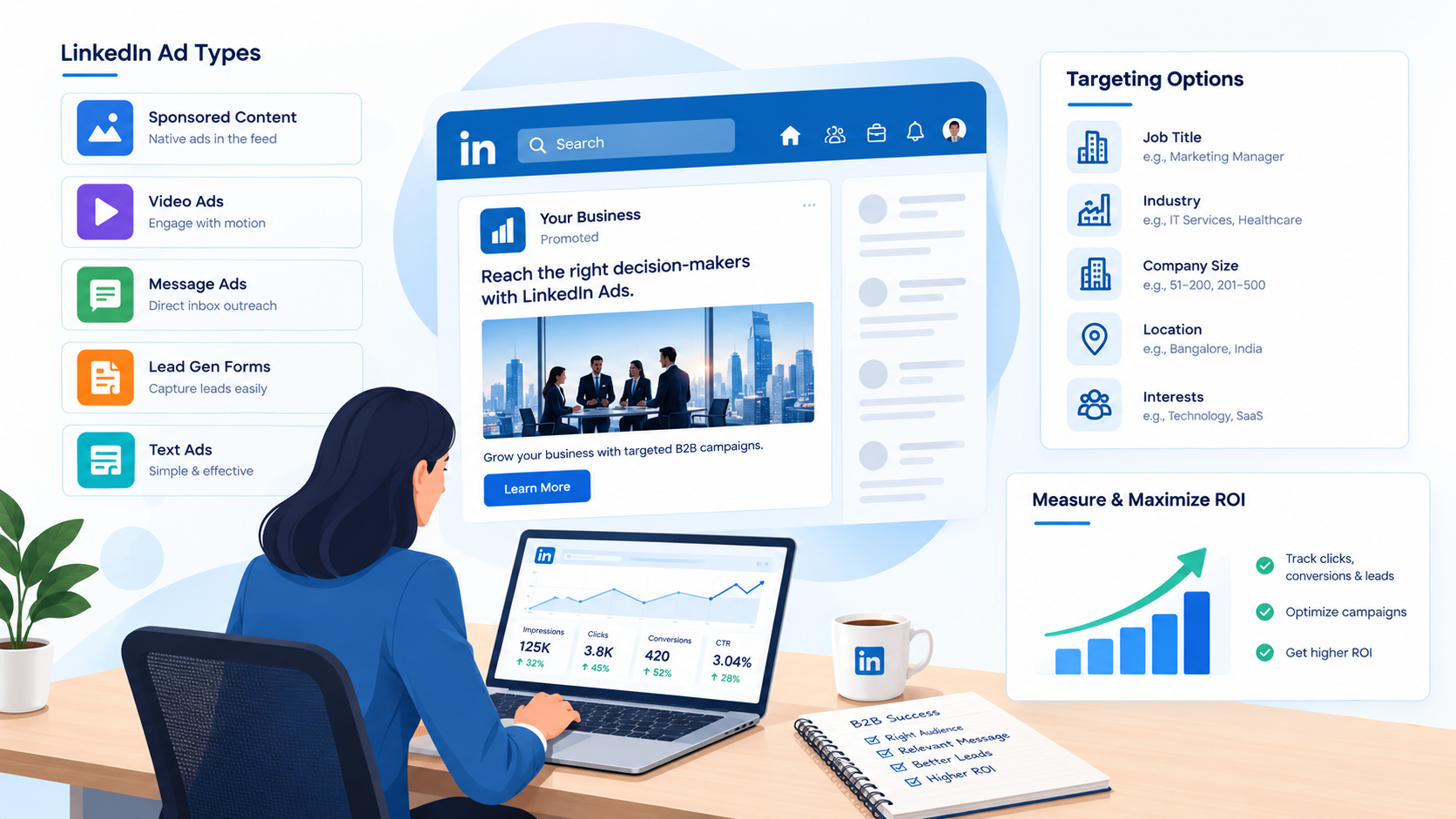
Choosing the right LinkedIn ad types is the single biggest factor in campaign performance. Below is a breakdown of every major format under LinkedIn sponsored content and LinkedIn sponsored ads, along with when to use each.
1. Single Image Ads
The simplest and most-used LinkedIn single image ads format. One image, a headline, and a CTA, shown directly in the feed with a "Promoted" tag.
Best for: Brand awareness, website traffic, retargeting. Tip: Use real people over stock photography, and keep headlines under 70 characters to avoid truncation.
2. LinkedIn Video Ads
LinkedIn video ads let you demonstrate a product, tell a brand story, or build trust through a short clip. Short-form video (under 30 seconds) with captions performs best, since most people watch with sound off.
Best for: Product demos, testimonials, brand storytelling.
3. Carousel Ads
LinkedIn carousel ads use 2–10 swipeable cards, ideal for step-by-step guides, feature breakdowns, or before/after comparisons.
Best for: Multi-feature products, case study storytelling. Tip: Keep it to 3–5 cards, longer carousels see drop-off.
4. Document Ads
LinkedIn document ads let members read a PDF, whitepaper, or deck directly inside the feed, with no landing page needed. This format is underused but highly effective for mid-funnel education because you can see exactly which pages people read.
Best for: Whitepapers, checklists, industry reports.
5. Message Ads & Conversation Ads
LinkedIn message ads and LinkedIn conversation ads land directly in a prospect's LinkedIn inbox. Message Ads carry one CTA; Conversation Ads offer a choose-your-path format with multiple CTAs.
Best for: Event invites, high-value offers, ABM outreach. Tip: Don't overuse this format on the same audience, response rates drop sharply after the first send.
6. Thought Leader Ads
LinkedIn thought leader ads let you boost an employee's organic post (rather than a brand page post) as a paid ad. Because it feels personal rather than corporate, engagement is typically much higher than standard sponsored content.
Best for: Building executive credibility, top-of-funnel trust.
7. Dynamic Ads (Spotlight & Follower Ads)
LinkedIn dynamic ads personalize the creative for each viewer, pulling in their profile photo or name. Spotlight Ads drive clicks to your site; Follower Ads grow your Company Page audience.
Best for: Personalized outreach at scale, page growth campaigns.
8. Text Ads
Small, budget-friendly pay-per-click ads that appear on the desktop sidebar. Lower visual impact, but a low-cost way to test messaging.
Quick Comparison Table
| Format | Best Use Case | Funnel Stage |
|---|---|---|
| Single Image | Awareness, retargeting | Top / Bottom |
| Video | Storytelling, demos | Top / Mid |
| Carousel | Feature walkthroughs | Mid |
| Document | Whitepapers, guides | Mid |
| Message/Conversation | Event invites, ABM | Bottom |
| Thought Leader | Trust building | Top |
| Dynamic | Personalized outreach | Top / Bottom |
| Text | Budget testing | Top |
Which Format Should You Start With?
If you're running your very first LinkedIn ad campaign, don't try every format at once. Start with Single Image Ads to establish a baseline cost per click and lead quality. Once you have that benchmark, layer in Document Ads for mid-funnel nurturing and Thought Leader Ads for top-of-funnel trust-building. Save Message and Conversation Ads for later, they perform best on a warm audience that already recognizes your brand, and overusing them on a cold list burns through your best-converting audience segment fast.
How to Plan a LinkedIn Ads Campaign (Step-by-Step)
Running a strong LinkedIn campaign management process starts long before you hit "publish." Here's the process we follow for client accounts:
Step 1: Set a clear objective. Choose Awareness, Consideration (website visits, engagement, video views), or Conversion (leads, website conversions) inside Campaign Manager. Your objective decides which ad formats are even available to you.
Step 2: Define your audience. Layer job title, seniority, company size, and industry. Avoid targeting more than 300,000 people, broad reach dilutes precision and inflates cost.
Step 3: Pick your ad format. Match the format to the funnel stage (see the table above).
Step 4: Set budget and schedule. Start with a daily budget you can monitor closely for the first two weeks, since early data guides your bidding decisions.
Step 5: Set up conversion tracking. Install the LinkedIn Insight Tag so every click, form fill, and page view feeds back into your reporting.
Step 6: Launch and monitor. Give the algorithm 2–3 weeks to gather enough data before making major changes.
This structured approach mirrors what works well across paid channels generally — for a broader look at why structured PPC planning pays off, see why PPC is important for your business and how PPC differs from CPC.
LinkedIn Ads Targeting: How to Reach the Right Audience
Precise LinkedIn audience targeting is what makes the platform worth its premium CPCs. Here's what to use:
- Job title & function targeting — Reach people by exact role, or by broader function (e.g., "Marketing" instead of "Marketing Manager") for wider but still relevant reach.
- Company targeting — Target by company name, size, industry, or growth rate.
- Matched Audiences — Upload your CRM contact list or website visitor data to retarget people who already know your brand. This usually delivers your strongest cost-per-lead.
- Account-based targeting (ABM) — Upload a list of target company names to run true account-based B2B LinkedIn marketing campaigns.
- Lookalike/Predictive Audiences — Feed LinkedIn a list of your best customers, and it finds similar profiles. Needs at least a few hundred seed contacts to work well.
Golden rule: Keep your audience between roughly 50,000–300,000 people. Too small, and the same people see your ad too often. Too broad, and you lose the precision you're paying for.
LinkedIn Ads Bidding: Choosing the Right Strategy
Your bidding choice directly affects your LinkedIn Ads cost and how fast your budget is spent.
- Maximum Delivery (automated): LinkedIn's algorithm spends your budget to get the most results. Good for new campaigns with no historical data.
- Manual bidding (Cost Per Click): You set the maximum price per click. Gives full control but needs regular adjustment.
- Cost Cap bidding: You set a target cost per result, and LinkedIn tries to stay near it, a good middle ground once you have some conversion history.
A practical sequence: Start on automated bidding for 2–3 weeks to gather conversion data, then shift to cost cap bidding once you've collected 30–50 conversions.
Just as with search advertising, bidding is only half the equation, automation tools can help fine-tune spend in real time. Our breakdown of PPC automation tools and AI and machine learning in PPC optimization covers how automation applies across paid channels, including LinkedIn.
How Much Do LinkedIn Ads Cost?
LinkedIn Ads cost more than Meta or Google on a per-click basis, often between $6–$12 per click for B2B campaigns, compared to $1–$3 on Meta. That's not a flaw; it reflects the value of reaching a verified, high-intent professional audience.
A workable starting budget for meaningful data is around $3,000–$5,000 per month. Below that, you won't gather enough volume to test creative and targeting properly.
Measuring LinkedIn Ads ROI
LinkedIn Ads ROI isn't just about cost per click, it's about pipeline. Focus on these metrics:
- Cost per qualified lead (not just cost per lead) — A lead that matches your ideal customer profile and passes sales qualification.
- Lead-to-opportunity rate — Fewer, better leads often beat a high volume of unqualified form fills.
- Frequency — Keep impressions per person under 5–6 in a 30-day window to avoid ad fatigue.
- Pipeline influenced — Track whether accounts that saw your LinkedIn ads eventually converted, even if LinkedIn wasn't the last touch.
Since most B2B deals take weeks or months to close, give a campaign at least 60–90 days before judging its ROI. Staying on top of these numbers is easier when you understand the platform's broader shifts, see our overview of PPC trends for 2025 for context on where paid media is heading.
Common LinkedIn Ads Mistakes to Avoid
Even experienced marketers fall into these traps:
- Targeting too broad an audience "just to be safe." This inflates spend without improving lead quality, the opposite of what precision targeting is meant to achieve.
- Asking for a demo on the first touch. Cold audiences rarely convert on a high-commitment CTA. Warm them up with content first.
- Judging performance too early. Pausing a campaign after two weeks almost always means judging on incomplete data.
- Ignoring frequency caps. Showing the same ad to the same person too many times damages brand perception and wastes spend.
- Running one ad format forever. Creative fatigue sets in faster on LinkedIn's smaller audiences than on Meta's much larger pool.
Many of these overlap with mistakes marketers make across paid channels generally, worth cross-checking against our list of common PPC mistakes to avoid before you scale spend.
LinkedIn Ads Best Practices for B2B Marketers
- Write for the scroll-stopper, not the brand deck. Lead with a specific problem your audience faces, not a company description.
- Match your offer to the funnel stage. Cold audiences respond to reports and guides, not a hard "Book a Demo" ask.
- Test one variable at a time. Change the image, then the headline, then the CTA, not all at once, so you know what actually moved the needle.
- Use captions on every video. Most LinkedIn videos are muted.
- Refresh Matched Audiences regularly. Old contact lists lose match accuracy as people change jobs.
- Don't ignore mobile. A large share of LinkedIn traffic is mobile, preview every ad on a phone screen before launch.
These fundamentals apply whether you're new to paid social or managing a mature account, much like the foundational habits covered in our guide to beginner-friendly Meta Ads strategy.
Why Choose Cronbay Tech for Your LinkedIn Ads Strategy
Running a strong LinkedIn advertising campaign takes more than picking a format and setting a budget, it requires continuous testing, precise LinkedIn campaign management, and reporting that ties spend back to actual pipeline, not just clicks.
At Cronbay Tech, we manage LinkedIn Ads strategy end-to-end: audience research, creative testing, bid management, and monthly reporting focused on qualified leads, not vanity metrics. We bring the same structured, data-first approach used across our broader PPC services for businesses, so your LinkedIn budget works as hard as your search and social spend.
If your current campaigns are producing clicks but not conversations with real buyers, it's usually a targeting or offer problem, not a platform problem. That's exactly where a dedicated team makes the difference.
How to Write LinkedIn Ad Copy That Doesn't Get Skipped
The first line of your ad is doing most of the work, LinkedIn cuts text off after roughly 150 characters before the "see more" prompt, so that opening line has to earn the click.
- Lead with the problem, not the product. "Struggling to prove which campaigns actually drove revenue?" stops a scroll far better than "We help marketing teams drive results."
- Be specific. Vague promises ("boost your growth") blend into the feed. Specific numbers, timeframes, or outcomes stand out.
- Keep the CTA proportional to the ask. "Download the guide" works on a cold audience; "Book a demo" works on a warm one.
- Write like a person, not a press release. The best-performing B2B ad copy on LinkedIn reads like a colleague sharing something useful, not a brand announcing itself.
Conclusion
LinkedIn Ads remain the strongest paid channel for reaching real B2B decision-makers, but only when the format, targeting, and bidding strategy are aligned with where your buyer actually is in their journey. Start with a tight audience, match your offer to the funnel stage, test one creative element at a time, and give the algorithm enough time to learn.
Turn Your LinkedIn Budget Into Qualified Pipeline
Talk to our PPC management team and let's build a LinkedIn Ads strategy designed to reach the right B2B audience and generate meaningful opportunities.
Talk to Our PPC Experts →FAQs
01 What is the minimum budget for LinkedIn Ads?
Most B2B advertisers need at least $3,000–$5,000 per month to gather enough data for meaningful optimization. Smaller budgets can still work but will take longer to show reliable results.
02 Which LinkedIn ad format works best for lead generation?
Single Image Ads paired with LinkedIn Lead Gen Forms tend to deliver the strongest lead volume, while Document Ads and Message Ads work well for more qualified, mid-to-bottom-funnel leads.
03 Why are LinkedIn Ads more expensive than Facebook or Google Ads?
LinkedIn's targeting is built on verified professional data, job titles, seniority, and company details, which makes the audience smaller but far more relevant for B2B, justifying the higher cost per click.
04 How long should I run a LinkedIn ad campaign before judging results?
At least 60–90 days. LinkedIn's algorithm needs a few weeks to optimize delivery, and B2B sales cycles often mean pipeline impact shows up weeks after the first click.
05 Can small businesses benefit from LinkedIn Ads?
Yes, if the average deal size justifies the cost per lead. Businesses with lower-ticket offers may find Meta or Google Ads more cost-efficient starting points.
06 What's the difference between Message Ads and Conversation Ads?
Message Ads send a single message with one CTA, while Conversation Ads offer multiple CTA paths, letting the prospect choose how they want to engage.
.png)