

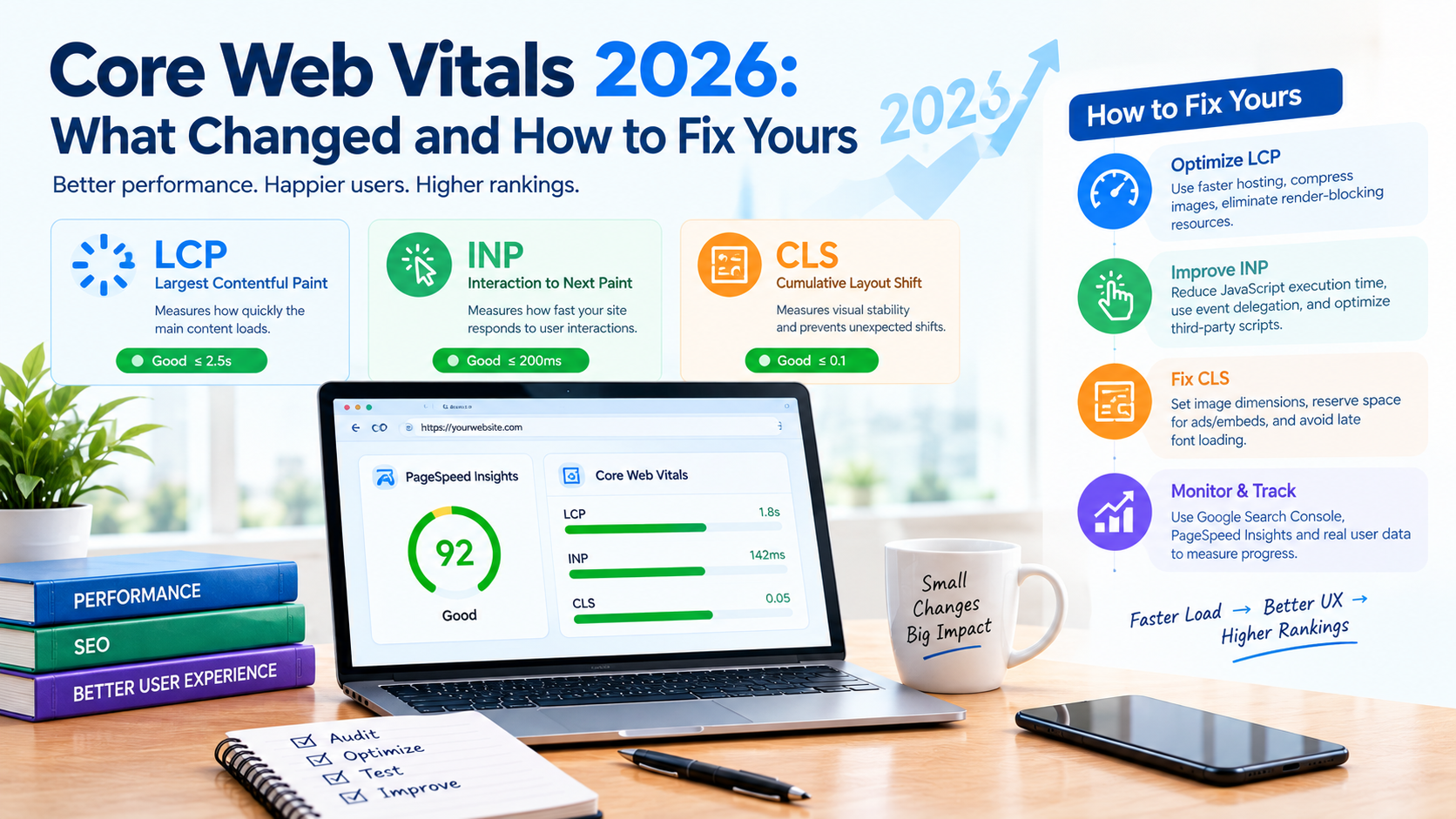
You run PageSpeed Insights, see a 90+ score, and feel good about it. Then you open Google Search Console and see "Needs Improvement" sitting right next to your best-performing landing pages. If that gap sounds familiar, you're not doing anything wrong, you're just measuring the wrong thing.
That mismatch is exactly where Core Web Vitals lives in 2026. Google isn't grading your site on a lab test anymore. It's grading you on how real visitors, on real phones, on real networks, actually experience your pages. And the rules around that grading have shifted enough in the last year that strategies built two or three years ago quietly stopped working.
This guide breaks down exactly what changed in Core Web Vitals 2026, how Google evaluates your site today, and a practical, metric-by-metric plan to fix Largest Contentful Paint (LCP), Interaction to Next Paint (INP), and Cumulative Layout Shift (CLS), without wasting a development sprint on the wrong page.
What Actually Changed in Core Web Vitals for 2026?
Google hasn't rewritten Core Web Vitals from scratch. What's changed is which metric carries the most weight, how strictly Google reports failures, and how directly these signals are tied to rankings.
1. INP has fully replaced FID as the responsiveness metric
For years, First Input Delay (FID) only measured how quickly your site reacted to a visitor's very first click or tap. That was a narrow, forgiving test, a page could feel sluggish through an entire session and still pass FID because the first interaction happened to be fast.
Interaction to Next Paint (INP) closes that loophole. It measures responsiveness across every click, tap, and keypress during a visitor's entire time on the page, and reports the value that best represents the worst-case delay. In practice, this means sticky headers, filter menus, chat widgets, pop-ups, and personalization scripts that used to hide behind a fast first click are now fully visible in your scores. If your site has ever felt "fine at first, then laggy," INP is the metric built to catch it.
2. Google has drawn a sharper line around what actually affects rankings
Google's own page experience documentation now states plainly that Core Web Vitals are used directly by ranking systems, while other page experience factors (HTTPS, mobile-friendliness, intrusive interstitials) support user satisfaction but don't independently push you up the results page. This distinction matters because it stops teams from treating "page experience" as one bundled ranking lever. Core Web Vitals are the part with a direct ranking connection, and the part worth prioritizing first when budgets are tight.
3. Search Console reporting is simpler, and less forgiving
The old Page Experience report in Search Console has been retired. Core Web Vitals and HTTPS reporting remain, but the softer, bundled scorecard is gone. Fewer dashboards doesn't mean fewer expectations, it means Google narrowed its own reporting down to the metrics it actually uses, and there's nowhere left to hide a weak score behind a good-looking overview panel.
The practical takeaway for 2026: you can no longer optimize for a single first-click benchmark and call your site "fast." Google is watching the entire session, on real devices, and reporting it in a much blunter way than before.
The 3 Core Web Vitals Metrics, Explained Simply
Google scores your site using three metrics. To pass, at least 75% of visits to a page (or group of similar pages) need to land in the "Good" range.
| Metric | Good Threshold | What It Actually Measures |
|---|---|---|
| Largest Contentful Paint (LCP) | 2.5 seconds or faster | How quickly the main visible content, usually a hero image, banner, or headline, finishes loading |
| Interaction to Next Paint (INP) | 200 milliseconds or faster | How quickly the page responds to a click, tap, or keypress, anywhere during the visit |
| Cumulative Layout Shift (CLS) | 0.1 or lower | Whether content jumps or shifts around while the page is loading |
LCP: your loading speed report card
LCP tracks the time it takes for the largest visible element, typically a hero image, product photo, or headline block, to render. Miss the 2.5-second mark and visitors start bouncing before they've even seen your offer.
INP: your responsiveness report card
INP is the metric most sites are quietly failing in 2026. It doesn't care about your first impression; it cares about every interaction across the session. A product filter that takes 400 milliseconds to respond on the fifth click is just as damaging to your INP score as a slow first click.
CLS: your visual stability report card
CLS answers a simple question: does anything move while a visitor is trying to read or click? A cookie banner that pushes content down, or an ad that loads late and shoves your "Buy Now" button, both count against you, and both are entirely preventable.
Field Data vs. Lab Data: Why a Green Lighthouse Score Doesn't Guarantee a Pass
This is where most confusion about Core Web Vitals SEO comes from. Teams run a test, see green, and assume they've passed, then Search Console tells a completely different story.
Lab data (from tools like PageSpeed Insights or Lighthouse) simulates a single page load under controlled, near-perfect conditions: a fast device, a clean browser, a strong network. It's excellent for debugging, it tells you exactly which script or image is slow, but it's also easy to pass by accident.
Field data is what Google actually ranks you on. It comes from the Chrome UX Report (CrUX), real visits, from real devices, over a rolling 28-day window, aggregated at the 75th percentile. It's slower to update, less forgiving, and far more representative of what your actual customers experience on a mid-range Android phone over patchy mobile data.
A practical, repeatable sequence to avoid wasted sprints:
- Start with field data. Check the Core Web Vitals report in Search Console to see which page groups (templates) are actually failing, and on which device type.
- Reproduce the issue in lab tools. Use PageSpeed Insights or DevTools to pinpoint the exact render-blocking script, oversized image, or layout trigger.
- Fix at the template level, not the single-URL level, more on why below.
- Wait for the field data window to catch up. Expect a lag of two to four weeks before Search Console reflects your fix.
How Google Actually Groups and Scores Your Pages
Search Console doesn't score every URL individually. It groups similar pages, say, every product page on the same template, and assigns the entire group a status based on its worst-performing metric. If your CLS is "Poor" because of one badly implemented promo banner, the whole template group can be labeled "Poor," even if LCP and INP are both green.
This is exactly why template-level fixes matter more than one-off page tweaks. A single hero-image compression job might fix one landing page's LCP, but if the entire product template shares the same render-blocking script, you're still failing at scale.
Fixing LCP: A Practical Order of Operations
LCP failures rarely come down to "someone forgot to compress an image." They usually trace back to one of three root causes: slow server response, render-blocking code, or a poorly prioritized hero resource. Work through fixes in this order:
- Check your server response time (TTFB) first. Slow hosting, uncached dynamic pages, or database bottlenecks delay everything downstream, no front-end fix will outrun a slow server.
- Eliminate render-blocking CSS and JavaScript. Years of accumulated plugins, tracking scripts, and theme bloat commonly delay the browser from even starting to render your main content.
- Prioritize the LCP element itself. Don't lazy-load your hero image, add
fetchpriority="high"so the browser fetches it immediately instead of waiting in a queue. - Compress and modernize images. Convert JPEG and PNG files to WebP or AVIF; these formats routinely cut file size by up to 50% with no visible quality loss.
- Use a CDN. A content delivery network serves images and static assets from a server physically closer to your visitor, which matters even more once you're targeting an audience outside your primary hosting region.
Done right, LCP should pass at the 75th percentile for mobile across the whole template, not just on a fresh desktop test in your office.
Fixing INP: Treat It as a Main-Thread Capacity Problem
INP fails when the browser's main thread is too busy running background JavaScript to respond to a click immediately. Every additional pixel-tracking script, chat widget, or personalization tag is competing for the same processing time your visitor's click needs.
- Audit third-party scripts first. Live chat tools, heatmap trackers, A/B testing snippets, and ad tags are frequent, underestimated INP culprits, they run constantly in the background and eat into responsiveness.
- Find and break up long tasks. JavaScript tasks that block the main thread for 100–500+ milliseconds are common after checkout flows, complex hydration, or event-heavy filter menus. Split them into smaller chunks.
- Move non-essential work off the main thread where possible, and defer anything that isn't needed for the initial interaction.
- Simplify your DOM. Pages with thousands of nested elements take longer to recalculate on every click. A cleaner page structure reduces interaction cost across the board.
- Question every "must-have" widget. If marketing wants a chatbot, a rotating banner, and a live inventory counter all on one page, someone needs to weigh that against a 250-millisecond INP hit on a mid-tier Android device, because that's a real, measurable trade-off, not a hypothetical one.
Fixing CLS: Reserve Space, Don't Let Anything Guess
CLS is the most preventable of the three metrics because nearly every cause comes down to the same root issue: the browser didn't know how much space something needed until after it had already loaded.
- Set explicit width and height on every image, video, and iframe. This reserves the correct space in the layout before the file finishes downloading, so nothing shifts around it.
- Handle banners and cookie notices intentionally. Consent banners, promo bars, and app install prompts should never push page content down after the first paint, reserve their space in advance or use an overlay instead.
- Watch your font loading. A font swap that changes line height or letter spacing can quietly shift an entire page's layout. Preload your key fonts to avoid this.
- Stabilize ad and third-party embed containers. If you don't control what loads inside a box, control the box itself with a fixed minimum height.
Prioritize by Template, Not by URL
The single biggest efficiency gain in Core Web Vitals optimization is switching from URL-by-URL firefighting to template-level triage. Fixing one page buys you one green checkmark. Fixing the template behind that page fixes every current and future page built on it.
A simple way to prioritize:
- High business impact + high page coverage (product pages, service pages, category pages), fix these first.
- High impact + low coverage (a key campaign landing page), fix next.
- Low impact + high coverage (blog templates), still worth fixing if they're dragging down your site-wide averages.
- Low impact + low coverage, address last.
This is the same logic behind building genuine topical authority in SEO: consistent, structural improvements across a group of related pages compound far more than isolated, one-off fixes ever will.
Where Core Web Vitals Fit in Your Broader SEO Strategy
It's worth being honest about what Core Web Vitals can and can't do for you. Good scores don't guarantee a first-page ranking, and Google has said as much directly, Core Web Vitals help most when your content and relevance are already competitive with the pages around you. They're a tie-breaker and a conversion protector, not a replacement for strong content, solid technical foundations, and genuine authority.
That means Core Web Vitals work best as one piece of a wider SEO services strategy, sitting alongside keyword-relevant content, a clean site structure, and credible backlinks. If your off-page SEO and content are already earning you visibility, Core Web Vitals is what keeps that visibility from leaking away through slow load times and clunky interactions. And if you're building your site's technical foundation as part of a larger, AI-search-ready strategy, it's worth reviewing it against a broader AI SEO checklist for 2026 so your performance work lines up with everything else Google (and AI-driven search) is now evaluating.
Why Core Web Vitals Work Is Rarely a One-Person Job
Fixing Core Web Vitals properly touches hosting configuration, caching rules, JavaScript architecture, image pipelines, and sometimes even design decisions made months ago. It's rarely something a single plugin install can solve, and it's easy to spend a month chasing lab scores that never move your real Search Console numbers.
This is exactly the kind of work a dedicated technical SEO team in Bangalore handles day to day, running a template inventory, diagnosing issues from real field data rather than a single lab test, and prioritizing fixes by business impact instead of chasing an arbitrary 100/100 score that won't actually move rankings. If you're comparing providers for this kind of work, it's worth seeing how established SEO companies in Bangalore approach technical performance audits before choosing a partner, and if you'd rather have a local, results-focused SEO company in Bangalore manage the entire process end to end, that's exactly the kind of engagement built for continuous, template-level Core Web Vitals ownership rather than a one-time fix.
How to Confirm You've Actually Fixed It
Because Search Console runs on a rolling 28-day field-data window, don't expect your dashboard to update the day after you deploy a fix. Set expectations accordingly, and build a simple checklist to validate your work instead of guessing:
- LCP is under 2.5 seconds, INP is under 200ms, and CLS is under 0.1 at the 75th percentile for mobile, across the full template group, not just your test page.
- You've re-checked Search Console after the 28-day window has fully rolled over, not just after a few days.
- You've assigned an owner for future regressions, since one new plugin or ad tag can undo months of work overnight.
Building a Monitoring Habit Instead of a One-Time Fix
Google's field-data reporting was never designed to be a real-time alert system, and that's exactly why so many sites relapse a few months after a successful Core Web Vitals fix. A new plugin, an added tracking pixel, or an unreviewed banner can quietly push LCP or INP back into the red, and because of the 28-day reporting lag, you often won't see it in Search Console until well after visitors have already felt it.
Treat Core Web Vitals as an operating discipline rather than a project with an end date:
- Run a lightweight audit on a fixed schedule, monthly is usually enough for most sites, more frequently if you ship new pages or features often.
- Test any new third-party script before it goes live, not after. Chat widgets, review plugins, and marketing pixels are the most common source of new INP regressions.
- Keep a record of what "good" looks like for each template, so a regression is obvious the moment someone checks, instead of getting rediscovered from scratch every few months.
- Loop performance into your content and design review process, not just your dev team's checklist. A new above-the-fold badge or a redesigned hero section can undo months of CLS work in a single release if nobody flags it.
This kind of ongoing ownership is where most in-house teams run out of bandwidth, not because the fixes are difficult, but because nobody owns watching for the next regression once the current fire is out.
Frequently Asked Questions
What is a good Core Web Vitals score in 2026?
A passing score means LCP under 2.5 seconds, INP under 200 milliseconds, and CLS at 0.1 or lower for at least 75% of your visits, measured through real-world field data rather than a single lab test.
Do Core Web Vitals guarantee higher rankings?
No. Google has confirmed that strong Core Web Vitals don't guarantee top rankings on their own. They help most when your content and relevance are already competitive, acting as a tie-breaker rather than a standalone ranking factor.
Why does my PageSpeed Insights score differ from my Search Console report?
PageSpeed Insights runs a single lab simulation under ideal conditions. Search Console reports real-world field data collected from actual visitors over a rolling 28-day period, which is what Google actually uses for ranking evaluation.
How long does it take for Core Web Vitals fixes to show up in Search Console?
Typically two to four weeks, since Google's field data is aggregated over a rolling 28-day window. A fix deployed today won't be reflected instantly, so plan your reporting timeline around that lag.
Can my site still rank well even if it fails Core Web Vitals?
Yes, strong content and relevance can still carry rankings. But failing Core Web Vitals hands an advantage to competitors with comparable content and better performance, and it typically hurts on-site conversion rates regardless of ranking position.
What's the most common mistake businesses make with Core Web Vitals optimization?
Fixing individual pages instead of the templates behind them, and relying on lab scores as proof of success instead of validating against real field data in Search Console.
The Takeaway
Core Web Vitals 2026 isn't about chasing a perfect Lighthouse score, it's about building a site that performs consistently for real visitors, on real devices, across an entire session. Diagnose with field data, fix at the template level, work through LCP, INP, and CLS in the order that matches how they actually fail, and give Google's reporting window time to catch up before declaring victory.
Get that system right, and Core Web Vitals stops being a recurring fire drill and becomes exactly what it should be: a quiet, reliable advantage that protects the rankings and conversions your content has already earned.
If you'd rather have a technical SEO team handle the audit, prioritization, and ongoing monitoring for you, Cronbay Tech's SEO services and dedicated technical SEO services in Bangalore are built around exactly this kind of template-first, field-data-driven approach.

.png)